

Introduction
Nanoviews is a small Direct DOM library for building user interfaces. A view is a tree of plain function calls that builds real DOM nodes, and the signals bound into it keep the nodes up to date: no JSX, no virtual DOM, no re-render.
- Small. Between 3.5 and 7 kB (minified and brotlied), signals included.
- Direct DOM. Less CPU and memory usage compared to a virtual DOM: the DOM is built once, and signals update it in place.
- Tree-Shakeable. Only the code you use is included in your bundle.
- TypeScript-first. Elements, attributes, events and components are typed.
import { signal } from 'nanoviews/store'import { button, component$, mount } from 'nanoviews'
const Counter = component$(() => {  const $count = signal(0)
  return (    button({      onClick() {        $count(count => count + 1)      }    })(      'count is ', $count    )  )})
mount(Counter, document.querySelector('#app')!)// <button>count is 0</button>
component$ makes a component, and mount builds it into the container and returns a function that unmounts it. The render runs once: a click writes $count, and only the text node bound to it changes, so the button reads count is 1.
To run the counter, first create a project.
Packages
Section titled “Packages”| Package | Description |
|---|---|
| nanoviews | A small Direct DOM library for building user interfaces. |
| @nanoviews/router | Nanoviews integration for @nano_kit/router: pages, nested layouts, code splitting, links and head management. |
| @nanoviews/testing-library | Testing utilities for Nanoviews, built on Testing Library. |
| @nanoviews/storybook | Storybook renderer for Nanoviews. |
| @nanoviews/storybook-vite | Nanoviews + Vite framework for Storybook. |
How It Works
Section titled “How It Works”Descriptions
Section titled “Descriptions”Each HTML element has a factory named after its tag. div(attributes) describes a div, and the second call, (...children), gives it children. A description is a function: called with no arguments, it builds the DOM node with its children.
import { div, h1, p, mount } from 'nanoviews'
const card = div({  class: 'card'})(  h1()('Nanoviews'),  p()('Builds real DOM'))
mount(() => card, document.querySelector('#app')!)// <div class="card"><h1>Nanoviews</h1><p>Builds real DOM</p></div>
mount makes that call, and a parent makes it for each child when it is built itself, so the whole tree is built top-down, in one pass. mount also opens the scope that bindings and effects belong to, so a description is built under mount only, never by hand. A component works the same way: its render runs when its instance is built into the parent, after the parent’s own render, so the parent’s context and scope are already in place.
Core Concepts covers descriptions, children and attributes in full, and Components covers components, their props and children.
Bindings
Section titled “Bindings”Besides descriptions and DOM nodes, a child can be a static value or an accessor: a signal, or an arrow function that reads signals, like () => $count() * 2. An attribute takes either too, except the on* event handlers, which are plain callbacks. A static value is written once. An accessor is bound: the node is created once, and an effect writes the new value into it whenever a signal the accessor read changes. Under the hood, a text binding works something like this:
import { signal, effect } from 'nanoviews/store'
const $text = signal('')const textNode = document.createTextNode('')
effect(() => {  textNode.data = $text()})
Attributes are bound the same way. A plain if or .map() in a render runs once, so a condition or a list that changes is a block, such as if_ or for_, which builds and removes its own part of the tree:
import { signal } from 'nanoviews/store'import { div, button, p, if_, component$, mount } from 'nanoviews'
const Details = component$(() => {  const $open = signal(false)
  console.log('render')
  return (    div()(      button({        'aria-expanded': $open,        onClick() {          $open(open => !open)        }      })(        'Details'      ),      if_($open)(        () => p()('Built on open, removed on close')      )    )  )})
mount(Details, document.querySelector('#app')!)// <div><button aria-expanded="false">Details</button></div>
A click writes $open: aria-expanded turns "true" and if_ builds the paragraph. render is logged once: there is no re-render and no virtual DOM to diff, only the bindings of $open run.
Reactive Values in Core Concepts covers bindings in full.
Nanoviews and Nano Kit
Section titled “Nanoviews and Nano Kit”Nanoviews gets its reactivity from the core of Nano Kit. The nanoviews/store entry point re-exports this core, so signals, computeds, effects, records and dependency injection come from one import next to the views. See Reactivity, and the Nano Kit store docs for depth.
@nano_kit/store extends the same core, and @nano_kit/query, @nano_kit/router, @nano_kit/intl and @nano_kit/platform-web are built on @nano_kit/store. Their signals are the signals of nanoviews/store, so a query result, a URL parameter, a translated message or a browser API value binds into a view as it is, with no adapter in between:
import { pick } from 'nanoviews/store'import { div, button, component$, mount } from 'nanoviews'import { localStored } from '@nano_kit/platform-web'import styles from './ThemeSwitch.module.css'
const $theme = localStored('theme', 'light')
const ThemeSwitch = component$(() => (  div({    class: [styles.app, pick(styles, $theme)]  })(    button({      onClick() {        $theme(theme => theme === 'light' ? 'dark' : 'light')      }    })(      'Theme: ', $theme    )  )))
mount(ThemeSwitch, document.querySelector('#app')!)// <div class="_app_… _light_…"><button>Theme: light</button></div>
$theme is kept in localStorage: a click writes it, the class and the text follow, and the next visit starts with the stored theme. Only the router has a Nanoviews package of its own, @nanoviews/router: it re-exports @nano_kit/router and adds the parts that render, such as pages, layouts and links.
Performance
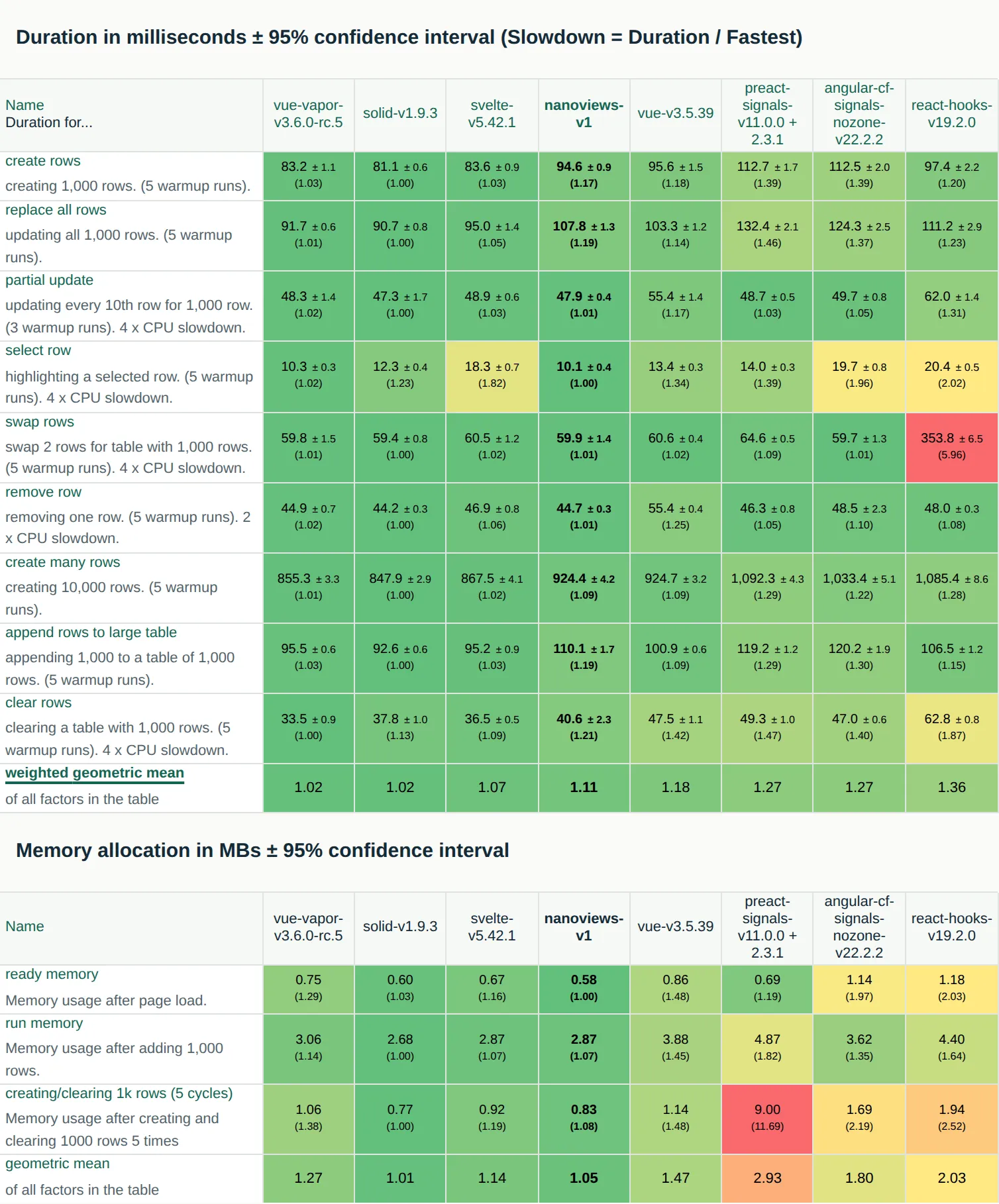
Section titled “Performance”Nanoviews is not the fastest library: Vue Vapor, Solid and Svelte are faster, but its performance is close to theirs, and it is faster than Vue, Preact, Angular and React. In the js-framework-benchmark results below, the weighted geometric mean of the slowdowns, each duration divided by the fastest one of its test, is 1.02 for Vue Vapor and Solid, 1.11 for Nanoviews and 1.36 for React.
Bundle Sizes
Section titled “Bundle Sizes”Each example is compared with the same app built on other stacks, in this repository and in the Nano Kit examples. A size is the sum of the minified JS chunks that vite build emits for the browser, raw and with Gzip at its default level. All rows were built with Vite 8, on the same day and with the same toolchain.
Vite Demo 🎨
Section titled “Vite Demo 🎨”Comparison of bundle sizes for the Vite Demo example and the same app on Solid and Svelte:
| Stack | Raw Size | Gzipped Size |
|---|---|---|
| Nanoviews | 8.33 kB | 3.26 kB |
| Solid | 11.49 kB | 4.59 kB |
| Svelte | 26.52 kB | 10.64 kB |
Weather App 🌤️
Section titled “Weather App 🌤️”Comparison of bundle sizes for the Weather App example and its implementations on other stacks:
| Stack | Raw Size | Gzipped Size |
|---|---|---|
| Nanoviews + Nano Kit | 27.98 kB | 10.36 kB |
| Nanoviews + Nano Kit + DI | 29.31 kB | 10.82 kB |
| Solid + Nano Stores | 36.41 kB | 13.55 kB |
| Svelte + Nano Stores | 56.08 kB | 21.34 kB |
| Svelte + Nano Kit | 61.74 kB | 23.12 kB |
| Svelte + Nano Kit + DI | 63.13 kB | 23.57 kB |
| React + Nano Stores | 206.71 kB | 65.12 kB |
| React + Nano Kit | 211.39 kB | 66.49 kB |
| React + Nano Kit + DI | 212.92 kB | 67.06 kB |
| React + Reatom | 228.10 kB | 72.15 kB |
| React + TanStack Query | 232.56 kB | 71.56 kB |
CV Generator 💼
Section titled “CV Generator 💼”Comparison of bundle sizes for the CV Generator example and its React implementation:
| Stack | Raw Size | Gzipped Size |
|---|---|---|
| Nanoviews + Nano Kit | 37.36 kB | 14.41 kB |
| React + Nano Kit | 221.66 kB | 70.24 kB |
Rick and Morty Encyclopedia 🛸
Section titled “Rick and Morty Encyclopedia 🛸”Comparison of bundle sizes for the Rick and Morty Encyclopedia example and its implementations on other stacks:
| Stack | Raw Size | Gzipped Size |
|---|---|---|
| Nanoviews + Nano Kit Query + Nano Kit Router | 43.54 kB | 17.75 kB |
| Svelte + Nano Kit Query + Nano Kit Router | 90.45 kB | 36.20 kB |
| React + Nano Kit Query + Nano Kit Router | 229.99 kB | 73.70 kB |
| React + TanStack Query + TanStack Router | 330.54 kB | 102.34 kB |